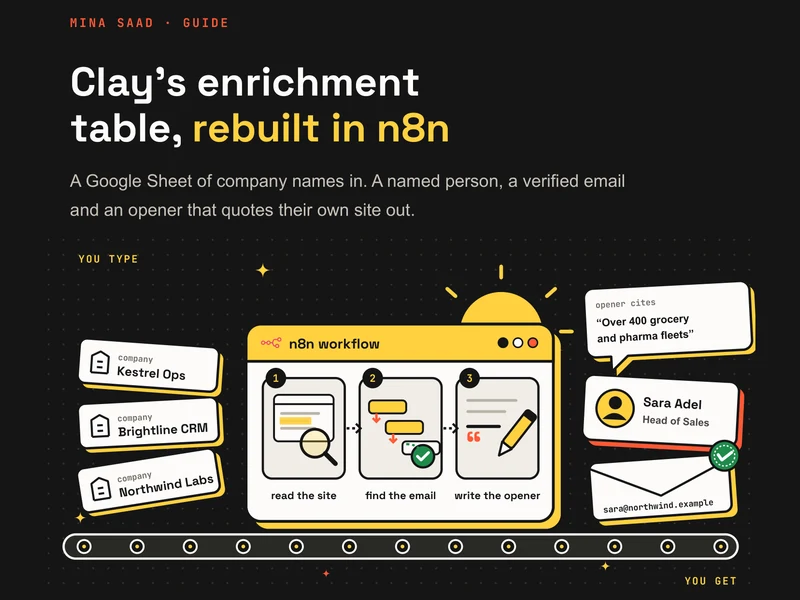
A free n8n workflow that does the job most people open Clay for. You type company names into a Google Sheet. For each row it finds a decision-maker, gets a verified email through a waterfall of providers, and writes an opener that quotes the company's own website. The guide shows how it works and how to set it up; the workflow JSON imports straight into n8n.
What one real run did
Ten company names in a sheet. Three minutes later:
- A named decision-maker on 9 of 10 rows, including one with no website.
- 9 verified emails through the waterfall.
- 7 openers that quote the company's own site.
- $0.36 for the whole run, about $0.04 per verified email.
One play, not all of Clay. No signals, no CRM sync, no sequencer.
How a row moves
One row at a time, so the credit budget is exact.
Find the domain
From the website column, or by search when it is empty.
Read the site
Firecrawl scrapes the homepage and the About page.
Find the person
One Hunter domain search for the role on the row, or the target roles in Table Settings.
Email waterfall
The company site first, then Hunter, then Dropcontact. It stops at the first verified address.
Write the opener
An LLM through OpenRouter writes one line from one checked fact.
Write back
Every result and its cost go back into the sheet, and a run report goes out by Gmail.
Two checks against made-up facts
The AI only reads text the workflow scraped. Code then checks every quote it gives against that text, word for word, and drops any fact whose quote is not on the page.
A second check reads the opener before it is written to the sheet. It is rejected unless it cites a fact that passed, every number in it is in that fact, it is 45 words or fewer, and it has no flattery and no "I came across".
Set it up
Import the JSON into n8n, then six steps.
Make the sheet
A Google Sheet called Lead Table with a Leads tab. The column list is in the guide.
Connect your accounts
Google Sheets, Firecrawl, OpenRouter, Hunter, Dropcontact and Gmail.
Pick your sheet
In Read Pending Rows and Write Row Back.
Fill Table Settings
Your ICP, your offer, and your address in place of REPORT_EMAIL.
Set your credit prices
To your own Hunter and Dropcontact plans.
Start small
max_credits_per_run at 10, then raise it.
Things to know before a real list
- Catch-all domains
- Some companies verify only as accept-all with a low score. The default threshold of 80 refuses them.
- Dropcontact
- It can take about 90 seconds a row. Fine on the 30 minute schedule.
- Cold email
- This finds and verifies addresses. Check the rules where you and your prospects are before you send.